General Ledger
G/L Accounts
Views/Record Types Supported
All
Update
Insert & Update
Limitations
None
Implementation Notes
Control Account Subledgers
Specifies each of the subledgers allowed to post to the account.
Separate each value to specify multiple sub-ledgers.
Transactional Optional Fields
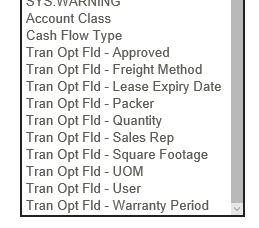
Transactional optional fields are listed at the bottom of the field list and are prefixed with ‘Tran Opt Fld’.
Rollup Accounts
Specifies each of the subledgers allowed to post to the account.
Separate each value to specify multiple sub-ledgers.
G/L Budget Sets
Views/Record Types Supported
All
Update
Insert/Update
Limitations
None
G/L Journal Batches
Views/Record Types Supported
All inc. Intercompany Transactions
Update
Insert only
Limitations
None
Writeback Fields
| GL0008.BATCHID | Batch Number |
| GL0008.DEBITTOT | Batch Debit Total |
| GL0008.CREDITTOT | Batch Credit Total |
| GL0008.ENTRYCNT | Batch Entry Count |
| GL0006.BATCHID | Entry Batch Number |
| GL0006.BTCHENTRY | Entry Number |
| GL0010.BATCHNBR | Entry Detail Batch Number |
| GL0010.JOURNALID | Entry Detail Entry Number |
| GL0010.TRANSNBR | Entry Detail Line Number |
Implementation Notes
Entry record can be either G/L Entry Header (GL0006) or G/L Batch (GL0008).
Batch Posting
The resulting batch may be posted by setting the ‘Post Created Batch’ (POSTCREATEDBATCH) field to one of the following values.
| Value | Notes |
|---|---|
| 0 | Do not post the batch. |
| 1 | Post the batch if are no errors during batch creation. |
| 2 | Post the batch irrespective of any errors. The batch will only be posted if the Error Action has been set to either Reject Record or Continue; when set to Abort the batch will not be posted. |
Deleting Empty/Erroneous Batches
If an error occurs during the creation of a batch OR if the batch is empty i.e. has no entries, the batch can be deleted by setting the 'Delete Empty/Erroneous Batch' (DELEMPTYBATCH) to '1'.
| Value | Notes |
|---|---|
| 0 | Do not delete the batch. |
| 1 | Delete the batch. |