Field Tokenisation
Field Tokenisation provides the means to customise how entries are populated ad how some fields such as Account and Project Codes can be composed.
Where a token is specified the token is substituted by the corresponding field’s value from the File Export data.
| File Export Field Name | Token |
|---|---|
| Branch | $BRNCH |
| Business Unit | $BUSUNT |
| Campaign | $CAMP |
| Client | $CLINT |
| Client Matter | $CLIMAT |
| Client:Campaign | $CLICAM |
| Client:Service | $CLISVC |
| Company | $COMP |
| Cost Centre | $CC |
| Customer:Job | $CUSJOB |
| Customer:Project | $CUSJPRJ |
| Department | $DEP |
| Division | $DIV |
| Employee First Name | $EMPFNAM |
| Employee Id | $EMPID |
| Employee Last Name | $EMPLNAM |
| Entity | $ENT |
| Function | $FUN |
| Is Billable? | $ISBILLNOINV |
| Is Billable? (Invoice) | $ISBILLINV |
| Job | $JOB |
| Location | $LOC |
| Market | $MKT |
| Practice Area | $PRCAREA |
| Product | $PRD |
| Profit Centre | $PFTCTR |
| Program | $PRG |
| Project | $PROJ |
| Region | $REG |
| Report Entry Description | $EDESC |
| Report Entry Expense Type Name | $RTNAME |
| Report Entry Vendor Description | $EVDESC |
| Report Entry Vendor Name | $EVNAM |
| Report ID | $RID |
| Report Name | $RNAME |
| Service | $SVC |
| Store | $STR |
Example
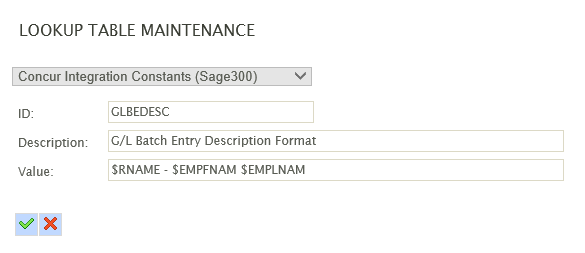 

The above example (taken from the Sage300 setup) will populate the corresponding field in Sage300 with:
- The Report Name field.
- A space character, then a single dash then another space field.
- The Employee First Name field.
- A single space.
- The Employee Last Name field.