Order Entry
- O/E Credit Notes
- O/E Credit Note Print
- O/E Invoices
- O/E Invoice Print
- O/E Orders (and Quotes)
- O/E Order Confirmation Print
- O/E Shipments
O/E Credit Notes
Update
Insert only
Serial & Lot Tracking Support
Yes
Limitations
No Project and Job Costing Support
Writeback Fields
| OE0240.CRDUNIQ | Credit Note Uniquifier |
| OE0240.CRDNUMBER | Credit Note Number |
| OE0220.LINENUM | Credit Note Detail Line Number |
| OE0220.DETAILNUM | Credit Note Detail, Detail Number |
| OE0220.INVUNIQ | Credit Note Header Uniquifier |
Implementation Notes
Detail Tax Calculation
OE0220.TINCSWBEFOREUNTPRCx (Tax Included x b/f Unit Price)
Denotes if the tax included flag should be set for a line prior to setting the unit price. Since Tax Included pricing calculates Tax on top of Unit price after the Tax Inc. Flag is set to true, this backs out the tax so the Unit Price is inclusive of tax.
Detail Line Matching
The Credit Note import supports importing by matching an invoice to pre-populate the credit note or explicitly inserting lines can be or a combination of both; as per entering a credit note via the Sage300 user interface.
In order to update a line that is auto-created when the invoice field is set at the header it must be matched against a line in the IMan dataset. Lines can be matched either by Item code or by Order Detail Line Number. The ‘Line Match Method’ (MATCHMTD) field controls how the lines are matched.
| Field Id | Line Match Method Value | Notes |
|---|---|---|
| Shipment Detail Line Number (INVLINENUM) (Default) | 0 | The value may be obtained either at the time the Shipment is created, or via a lookup against the Shipment & Shipment Details. |
| Item Code | 1 | When matching by item code, ensure there are no duplicate items in the invoice. When duplicate items are present only the first item is updated. |
When creating a credit note without change to any of the detail lines it is not necessary to include any detail records to the import. This can be achieved through:
- Not mapping a detail record to the O/E Credit Note detail view or;
- Filter/remove any detail records prior to the Sage300 connector.
If the Invoice Number field is not set at the header or to insert new lines to a credit note, set the ‘Line Match Method’ (MATCHMTD) field to 0 and ensure the INVLINENUM field is either not set to a value or empty.
O/E Credit Note Print
This allows O/E Credit/Debit Notes to be printed to either a local printer or exported to file.
Update
Create only
Implementation Notes
Print Credit/Debit Note
When set to true will print the report to the specified printer.
Printer Name
The name of the locally installed printer. The printer cannot be a network printer.
Export File Path
The file to export the report to.
Credit/Debit Form
The Crystal Report form.
Credit/Debit Note Number
The credit/debit number to print.
O/E Invoices
Update
Insert only
Limitations
None
Writeback Fields
| OE0420.INVUNIQ | Invoice Uniquifier |
| OE0420.INVNUMBER | Invoice Number |
| OE0420.CHECKNUM | Invoice Prepayment Cheque/Receipt Number |
| OE0420.REBATCHNUM | Invoice Prepayment Receipt Batch Number |
| OE0400.LINENUM | Invoice Detail Line Number |
| OE0400.DETAILNUM | Invoice Detail, Detail Number |
| OE0400.INVUNIQ | Invoice Header Uniquifier |
Implementation Notes
Prepayments
OE0692.SWPREPAY (Prepayment Made Against Shipment)
When True a prepayment will be made against the shipment. When a prepayment is made against the shipment the following fields are processed:
| Field Id | Name | Description |
|---|---|---|
| ARBTCHAPPEND (Optional) | Append Prepayment To Existing Batch | Specifies if the prepayment should be appended to an existing open A/R Receipt Batch. If a batch cannot be found matching the criteria a new A/R Batch will be created. 1Append to Batch Per Day By Description - The prepayment will be appended to the first open batch with the same description which has a batch date of the day of import. 2Append to Batch Per Day By Bank - The prepayment will be appended to the first open batch with the same bank which has a batch date of the day of import. 3Append to Batch By Description - The prepayment will be appended to the first open batch with the same description. 4Append to Batch By Bank - The prepayment will be appended to the first open batch with the same bank code. |
| BANKCODE (Mandatory) | Bank Code | The bank to which the deposit is made. |
| RECPAMOUNT (Mandatory) | Receipt Amount | The receipt amount. |
| BANKCURN (Optional) | Bank Currency | |
| BANKRATE (Optional) | Bank Rate | The Bank Rate |
| CHECKDATE(Optional) | Check Date | The deposit date. |
| BANKRECTYP (Optional) | Receipt Type | |
| ARBTCHDESC (Optional) | A/R Receipt Batch Description | When not specified the A/R Receipt Batch Description defaults to: “O/E Prepayment” |
| CRATE (Optional) | Customer Rate | |
| CRATEDATE (Optional) | Customer Rate Date | |
| CRATETYPE (Optional) | Customer Rate Type | |
| CHECKNUM (Optional) | Check/Receipt Number | This is a writeback field, but may also be specified. |
| RATETYPE (Optional) | Rate Type | Check/Receipt Rate Type |
| RATEDATE (Optional) | Rate Date | Check/Receipt Rate Date |
| REBATCHNUM (Optional) | Receipt Batch Number | Writeback field to capture A/R Receipt Batch number. |
Credit Limit Check/Approval
To approve a shipment where the customer is over the Credit Limit the following fields are required:
| Field Id | Name | Description |
|---|---|---|
| APPROVECRDLIMIT (Mandatory) | Approve Credit Limit Flag | Set to True to approve order where customer fails credit limit. |
| APPROVEBY (Mandatory) | Authorising User Id | The Sage300 user id which has authority to override credit limit. |
| APPPASSWRD (Mandatory) | Authorising User Password | The password for the Sage300 user id specified in the previous field. This field must be encrypted using the EncryptString function (see EncryptString). |
Detail Tax Calculation
OE0400.TINCSWBEFOREUNTPRCx (Tax Included x b/f Unit Price)
Denotes if the tax included flag should be set for a line prior to setting the unit price. Since Tax Included pricing calculates Tax on top of Unit price after the Tax Inc. Flag is set to true, this backs out the tax so the Unit Price is inclusive of tax.
Detail Line Matching
As per entering an invoice via the Sage300 user interface, the detail lines are generated on entry of the shipment number field.
The lines in the shipment must be matched against a line in the IMan dataset. Lines can be matched either by Item code or by Order Detail Line Number. The ‘Line Match Method’ (MATCHMTD) field controls how the lines are matched.
| Field Id | Line Match Method Value | Notes |
|---|---|---|
| Shipment Detail Line Number (SHILINENUM) (Default) | 0 | The value may be obtained either at the time the Shipment is created, or via a lookup against the Shipment & Shipment Details. |
| Item Code | 1 | When matching by item code, ensure there are no duplicate items in the invoice. When duplicate items are present only the first item is updated. |
When creating an invoice without change to any of the detail lines it is not necessary to include any detail records to the import. This can be achieved through:
- Not mapping a detail record to the O/E Invoice Detail view or;
- Filter/remove any detail records prior to the Sage300 connector.
Invoice from Multiple Shipments
To invoice multiple shipments specify each of the Shipment Numbers which are to be invoiced on the Shipment (SHINUMBER) field where each shipment number is separated by a comma. When invoicing multiple shipments it is mandatory to specify the Shipment Number (SHINUMBER) field on the detail level, when the detail level is mapped.
O/E Invoice Print
This allows O/E invoices to be printed to either a local printer or exported to file.
Update
Create only
Implementation Notes
| Field | Description |
|---|---|
| Print Invoice | When set to true will print the report to the specified printer. |
| Printer Name | The name of the locally installed printer. The printer cannot be a network printer. |
| Export File Path | The file to export the report to. |
| Invoice Form | The Crystal Report form. |
| Invoice Number | The invoice number for the invoice to print. |
O/E Orders (and Quotes)
Views/Record Types Supported
All
Update
Insert, Update, Delete & Synchronise
Serial & Lot Tracking Support
Yes
Limitations
None
Writeback Fields
| OE0520.ORDUNIQ | Order Uniquifier |
| OE0520.ORDNUMBER | Order Number |
| OE0520.SHINUMBER | Shipment Number generated from Order |
| OE0520.INVNUMBER | Invoice Number generated from Order |
| OE0520.CHECKNUM | Order Prepayment Cheque/Receipt Number |
| OE0520.REBATCHNUM | Order Prepayment Receipt Batch Number |
| OE0500.LINENUM | Order Detail Line Number |
| OE0500.ORDUNIQ | Order Detail Order Uniquifier |
Implementation Notes
Allocate Serial/Lot Numbers (ALLOCSERLOT)
When the ability to allocate serial or lot numbers can be allocated during order entry, this field allows you to bypass the allocation step when set to False.
Prepayments
Prepayment Made Against Order(OE0520.SWPREPAY)
When True a prepayment will be made against the order. When a prepayment is made against the order the following fields are processed:
| Field Id | Name | Description |
|---|---|---|
| ARBTCHAPPEND (Optional) | Append Prepayment To Existing Batch | Specifies if the prepayment should be appended to an existing open A/R Receipt Batch. If a batch cannot be found matching the criteria a new A/R Batch will be created. 1Append to Batch Per Day By Description - The prepayment will be appended to the first open batch with the same description which has a batch date of the day of import. 2Append to Batch Per Day By Bank - The prepayment will be appended to the first open batch with the same bank which has a batch date of the day of import. 3Append to Batch By Description - The prepayment will be appended to the first open batch with the same description. 4Append to Batch By Bank - The prepayment will be appended to the first open batch with the same bank code. |
| BANKCODE (Mandatory) | Bank Code | The bank to which the deposit is made. |
| RECPAMOUNT (Mandatory) | Receipt Amount | The receipt amount. |
| BANKCURN (Optional) | Bank Currency | |
| BANKRATE (Optional) | Bank Rate | The Bank Rate |
| CHECKDATE (Optional) | Check Date | The deposit date. |
| BANKRECTYP (Optional) | Receipt Type | |
| ARBTCHDESC (Optional) | A/R Receipt Batch Description | When not specified the A/R Receipt Batch Description defaults to: “O/E Prepayment” |
| CRATE (Optional) | Customer Rate | |
| CRATEDATE (Optional) | Customer Rate Date | |
| CRATETYPE (Optional) | Customer Rate Type | |
| CHECKNUM (Optional) | Check/Receipt Number | This is a writeback field, but may also be specified. |
| RATETYPE (Optional) | Rate Type | Check/Receipt Rate Type |
| RATEDATE (Optional) | Rate Date | Check/Receipt Rate Date |
| REBATCHNUM (Optional) | Receipt Batch Number | Writeback field to capture A/R Receipt Batch number. |
Credit Limit Check/Approval
To approve an order where the customer is over the Credit Limit the following fields are required:
| Field Id | Name | Description |
|---|---|---|
| APPROVECRDLIMIT (Mandatory) | Approve Credit Limit Flag | Set to True to approve order where customer fails credit limit. |
| APPROVEBY (Mandatory) | Authorising User Id | The Sage300 user id which has authority to override credit limit. |
| APPPASSWRD (Mandatory) | Authorising User Password | The password for the Sage300 user id specified in the previous field. This field must be encrypted using the EncryptString function. |
Detail Tax Calculation
OE0500.TINCSWBEFOREUNTPRCx (Tax Included x b/f Unit Price)
Denotes if the tax included flag should be set for a line prior to setting the unit price. Since Tax Included pricing calculates Tax on top of Unit price after the Tax Inc. Flag is set to true, this backs out the tax so the Unit Price is inclusive of tax.
Updating Orders
Orders can be updated by setting the Order Number (ORDNUMBER) field.
To update a line within an order the line must be identified or matched to the line being updated. This is achieved by setting the either the LINENUM or ITEM fields.
The ‘Line Match Method’ (MATCHMTD) field controls which field is used to match a particular line.
| Field Id | Line Match Method Value | Notes |
|---|---|---|
| Line Number (LINENUM) (Default) | 0 | The value may be obtained either at the time the Order is created, or via a lookup against the Order & Order Details. |
| Item Code | 1 | When matching by item code, ensure there are no duplicate items in the invoice. When duplicate items are present only the first item is updated. |
Creating Orders from Quotes & Standing Orders
To create an Active order from either a quote or standing order:
- Set the existing quote or standing order number to the Order Number (ORDNUMBER) field.
- Set 1 to the Type (TYPE) field.
- Set the Update Operation to either 'Update' or 'Insert/Update'.
Synchronise Update Method
When the Synchronise update method is selected updates to existing Orders will follow Synchronise deferential logic to add/delete line items.
The differential logic applied in the synchronise operation is made in conjunction with the line matching logic described above.
Synchronise logic (to delete records not present in the incoming data) will be applied to each line item.
Deleting Orders
When the update operation is set to Delete, each matching order, as determined by the Order Number (ORDNUMBER) field will be deleted.
Deleting Lines
Existing lines can be deleted by setting the Delete Record (SYS.DELETE) field on the line to true.
O/E Order Confirmation Print
This allows O/E Order Confirmation to be printed to either a local printer or exported to file.
Update
Create only
Implementation Notes
Print Order Confirmation
When set to true will print the report to the specified printer.
Printer Name
The name of the locally installed printer. The printer cannot be a network printer.
Export File Path
The file to export the report to.
Order Confirmation Form
The Crystal Report form.
Order Confirmation Note Number
The order number to print.
O/E Shipments
Views/Record Types Supported
All
Update
Insert & Update
Serial & Lot Tracking Support
Yes
Limitations
None
Writeback Fields
| OE0692.SHIUNIQ | Shipment Uniquifier |
| OE0692.SHINUMBER | Shipment Number |
| OE0692.INVNUMBER | Invoice Number generated from Order |
| OE0692.CHECKNUM | Shipment Prepayment Cheque/Receipt Number |
| OE0692.REBATCHNUM | Shipment Prepayment Receipt Batch Number |
| OE0691.LINENUM | Shipment Detail Line Number |
| OE0691.ORDUNIQ | Shipment Detail Shipment Uniquifier |
Implementation Notes
Shipment against Order
To generate a shipment against an order set the OE0692.SHINUMBER (Shipment Number) field then see the section on Detail Line Matching below for instructions on how to manage the updating of lines on the shipment.
Ship from Multiple Orders
To ship multiple orders specify each of the Order Numbers which are to be shipped on the Order Number (ORDNUMBER) field where each order number is separated by a comma. When shipping multiple orders it is mandatory to specify the Order Number (ORDNUMBER) field on the detail level, when the detail level is mapped.
Orderless Shipments
As per Sage300 Shipments can be created without having to first create an Order. To create an Orderless shipment simply set the Customer number without setting the Order Number field.
Prepayments
OE0692.SWPREPAY (Prepayment Made Against Shipment)
When True a prepayment will be made against the shipment. When a prepayment is made against the shipment the following fields are processed:
| Field Id | Name | Description |
|---|---|---|
| Name | ||
| ARBTCHAPPEND (Optional) | Append Prepayment To Existing Batch | Specifies if the prepayment should be appended to an existing open A/R Receipt Batch. If a batch cannot be found matching the criteria a new A/R Batch will be created. 1Append to Batch Per Day By Description - The prepayment will be appended to the first open batch with the same description which has a batch date of the day of import. 2Append to Batch Per Day By Bank - The prepayment will be appended to the first open batch with the same bank which has a batch date of the day of import. 3Append to Batch By Description - The prepayment will be appended to the first open batch with the same description. 4Append to Batch By Bank - The prepayment will be appended to the first open batch with the same bank code. |
| BANKCODE (Mandatory) | Bank Code | The bank to which the deposit is made. |
| RECPAMOUNT (Mandatory) | Receipt Amount | The receipt amount. |
| BANKCURN (Optional) | Bank Currency | |
| BANKRATE (Optional) | Bank Rate | The Bank Rate |
| CHECKDATE(Optional) | Check Date | The deposit date. |
| BANKRECTYP (Optional) | Receipt Type | |
| ARBTCHDESC (Optional) | A/R Receipt Batch Description | When not specified the A/R Receipt Batch Description defaults to: “O/E Prepayment” |
| CRATE (Optional) | Customer Rate | |
| CRATEDATE (Optional) | Customer Rate Date | |
| CRATETYPE (Optional) | Customer Rate Type | |
| CHECKNUM (Optional) | Check/Receipt Number | This is a writeback field, but may also be specified. |
| RATETYPE (Optional) | Rate Type | Check/Receipt Rate Type |
| RATEDATE (Optional) | Rate Date | Check/Receipt Rate Date |
| REBATCHNUM (Optional) | Receipt Batch Number | Writeback field to capture A/R Receipt Batch number. |
Credit Limit Check/Approval
To approve a shipment where the customer is over the Credit Limit the following fields are required:
| Field Id | Name | Description |
|---|---|---|
| APPROVECRDLIMIT (Mandatory) | Approve Credit Limit Flag | Set to True to approve order where customer fails credit limit. |
| APPROVEBY (Mandatory) | Authorising User Id | The Sage300 user id which has authority to override credit limit. |
| APPPASSWRD (Mandatory) | Authorising User Password | The password for the Sage300 user id specified in the previous field. This field must be encrypted using the EncryptString function. |
Detail Tax Calculation
OE0691.TINCSWBEFOREUNTPRCx (Tax Included x b/f Unit Price)
Denotes if the tax included flag should be set for a line prior to setting the unit price. Since Tax Included pricing calculates Tax on top of Unit price after the Tax Inc. Flag is set to true, this backs out the tax so the Unit Price is inclusive of tax.
Detail Line Matching – When Matching to Order
As per entering an invoice via the Sage300 user interface, the detail lines are generated on entry of the order number field.
The lines in the shipment must be matched against a line in the IMan dataset. Lines can be matched either by Item code or by Order Detail Line Number. The ‘Line Match Method’ (MATCHMTD) field controls how the lines are matched.
| Field Id | Line Match Method Value | Notes |
|---|---|---|
| Order Detail Line Number (ORDLINENUM) (Default) | 0 | The value may be obtained either at the time the Order is created, or via a lookup against the Order & Order Details. |
| Item Code | 1 | When matching by item code, ensure there are no duplicate items in the invoice. When duplicate items are present only the first item is updated. |
When creating a shipment without change to any of the detail lines it is not necessary to include any detail records to the import. This can be achieved through:
- Not mapping a detail record to the O/E Shipment Detail view or;
- Filter/remove any detail records prior to the Sage300 connector.
Detail Line Matching – When Updating Shipment
In order to update a line within an existing shipment, set the LINENUM (Line Number) field to a valid value.
Kitting details/Components
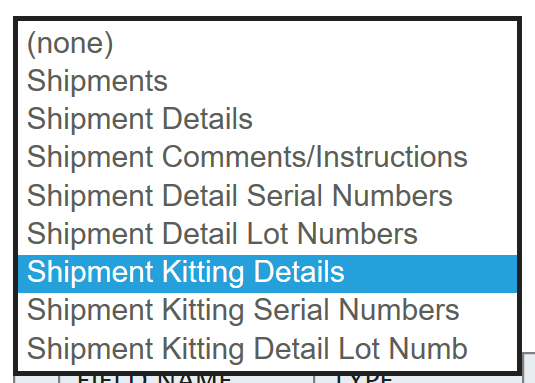
IMan supports the ability to set the few values allowed on kit components. Similarly to the Sage300 User Interface kit components are a child of the Detail level. To specify the component record to update it is necessary to map the component (un)formatted item code to the Item Number field on the kit level.
If no matching item can be found an error is raised; conversely IMan does not support the ability to specifying the values of a component if the item appears multiple times in the kit. When duplicate items are present only the first item is updated.
Serial & Lot Number Kitting Details/Components
Serial & Lot number tracked kitting & BOM components it is necessary to set as children to the detail the kit/BOM components.